Every PHP developer has built a login page at some point. Most of us started with the classic five-minute tutorial: plain-text passwords, no hashing, sessions slapped together with $_SESSION, and maybe a sprinkle of mysql_real_escape_string if we were feeling fancy.
Ten years later, the same patterns still appear in legacy codebases, freelance projects, and unfortunately, some new side projects too.
The truth is, a login system is never “just a form”. It’s the front door to everything sensitive your application handles. Get it wrong and you’re not only leaking credentials — you’re handing attackers persistent access, session hijacking opportunities, and sometimes full database control.
PHP Login From Scratch: The Right Way

In this post we’re focusing strictly on the backend. No CSS tricks, no JavaScript validation theater. We’re building the server-side logic that actually matters: secure password storage, proper session management, rate limiting basics, SQL injection defense, and a handful of subtle decisions that separate toy code from production-grade authentication.
Whether you’re maintaining old PHP 7 code or starting fresh in 2026, these are the patterns I still use on real projects. Let’s do it properly this time.
Creating a Production-Ready Login Backend with PHP & MySQL
First of all we must understand what make a login page secure, the password Hashing:
Password Hashing: The Only Acceptable Way
Storing passwords correctly is the single most important security decision in any login system. Get this wrong and no amount of CSRF tokens, rate limiting, or HTTPS will save you when credentials leak.
In 2025 the rule is brutally simple: never store passwords. Store only irreversible, salted hashes. And unless you have a very specific reason (which 99% of PHP developers don’t), use the built-in functions that PHP gives you for free.
What You Should Be Using Right Now
// Hashing a password during registration
$password = $_POST['password']; // coming from the form

$hash = password_hash($password, PASSWORD_DEFAULT);

// Store $hash in your database (VARCHAR(255) is safe)PASSWORD_DEFAULT currently uses bcrypt (as of PHP 8.4+ it’s still bcrypt with cost 10–13 depending on version), but the beauty is that PHP can upgrade the algorithm behind the scenes when better ones become standard. Your code stays the same.
Verifying on Login
// Fetch the stored hash from DB
$stmt = $pdo->prepare("SELECT password_hash FROM users WHERE email = ?");
$stmt->execute([$email]);
$user = $stmt->fetch();

if ($user && password_verify($password, $user['password_hash'])) {
    // Login successful
} else {
    // Invalid credentials
}password_verify() handles everything: it reads the algorithm identifier, the cost factor, and the salt that are embedded in the hash string itself. You never touch salts manually.
Common (and Dangerous) Mistakes I Still See
- Using
md5(),sha1(),sha256()(even with salt)
All of these are fast cryptographic hashes, which means they’re perfect for brute-force and rainbow table attacks on leaked databases. - Rolling your own:
hash('sha512', $salt . $password)
Even if you use a per-user random salt, it’s still orders of magnitude weaker than bcrypt/argon2 because of low iteration count. - Using
crypt()directly
The oldcrypt()API is messy and error-prone.password_hash()is just a much better wrapper.
Upgrading Cost Factor (When You Should)
Bcrypt cost increases computation time exponentially. Default is usually fine, but on modern servers you can safely push it higher.
// Example: force a higher cost (takes ~0.1–0.3s on most servers)
$options = ['cost' => 12];
$hash = password_hash($password, PASSWORD_BCRYPT, $options);Test it first. If login takes noticeably longer than 200–300 ms, dial it back. Users notice slow logins more than you think.
Rehashing on Login (Automatic Algorithm Upgrades)
This is one of the nicest features of PHP’s password API:
if (password_verify($password, $storedHash)) {
    // Successful login → check if we should upgrade the hash
    if (password_needs_rehash($storedHash, PASSWORD_DEFAULT)) {
        $newHash = password_hash($password, PASSWORD_DEFAULT);
        // Update the database with $newHash
        $stmt = $pdo->prepare("UPDATE users SET password_hash = ? WHERE id = ?");
        $stmt->execute([$newHash, $userId]);
    }

    // Proceed with session creation
}When PHP eventually switches PASSWORD_DEFAULT to Argon2id (already available as PASSWORD_ARGON2ID), your system will quietly upgrade every user the next time they log in. Zero downtime, zero user action required.
Bottom line: if you’re still writing custom hashing code in PHP in 2026, stop. Use password_hash() and password_verify(). Everything else is playing with fire.
Next section we’ll look at how to combine this with proper session handling so even a leaked hash database doesn’t give attackers immediate access.
Down to business: Here’s What Actually Works
First of all, we will create a login page:
Creating the front-end login page
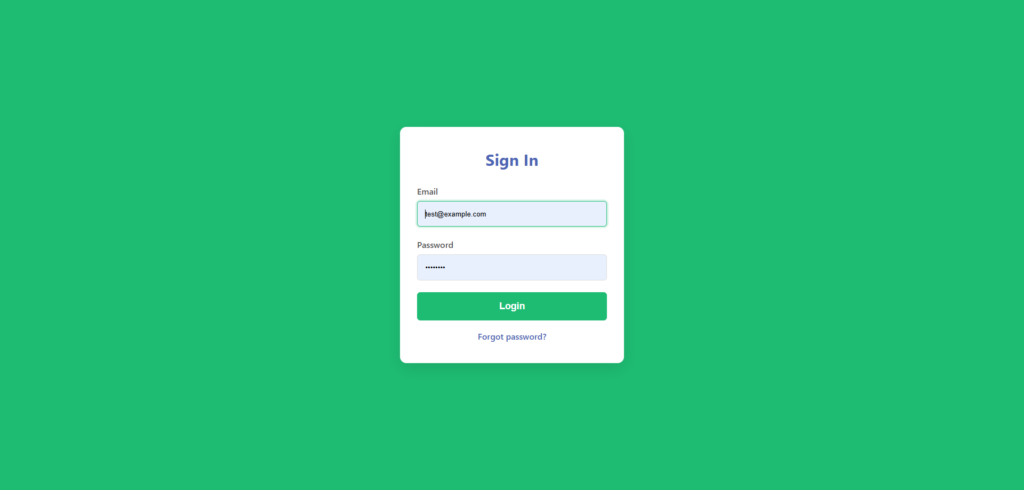
Here’s the code for this simply login page, what can be named index.php:
<!DOCTYPE html>
<html lang="en">
<head>
  <meta charset="UTF-8">
  <meta name="viewport" content="width=device-width, initial-scale=1.0">
  <title>Login - Your App</title>
  <style>
    :root {
      --primary-green: #1ebc73;
      --primary-blue: #4d65b4;
      --bg-light: #f8f9fa;
      --text-dark: #333;
    }

    * { margin:0; padding:0; box-sizing:border-box; }
    body {
      font-family: system-ui, -apple-system, sans-serif;
      background: var(--primary-green);
      color: var(--text-dark);
      min-height: 100vh;
      display: grid;
      place-items: center;
    }

    .login-container {
      background: white;
      padding: 2.5rem 2rem;
      border-radius: 12px;
      box-shadow: 0 10px 30px rgba(0,0,0,0.1);
      width: 100%;
      max-width: 420px;
    }

    h1 {
      color: var(--primary-blue);
      text-align: center;
      margin-bottom: 1.8rem;
      font-size: 1.9rem;
    }

    .form-group {
      margin-bottom: 1.4rem;
    }

    label {
      display: block;
      margin-bottom: 0.5rem;
      font-weight: 500;
      color: #555;
    }

    input {
      width: 100%;
      padding: 0.9rem;
      border: 1px solid #ddd;
      border-radius: 6px;
      font-size: 1rem;
    }

    input:focus {
      outline: none;
      border-color: var(--primary-green);
      box-shadow: 0 0 0 3px rgba(30,188,115,0.15);
    }

    button {
      width: 100%;
      padding: 1rem;
      background: var(--primary-green);
      color: white;
      border: none;
      border-radius: 6px;
      font-size: 1.1rem;
      font-weight: 600;
      cursor: pointer;
      transition: background 0.2s;
    }

    button:hover {
      background: #18a964;
    }

    .error {
      color: #d32f2f;
      font-size: 0.9rem;
      margin-top: 0.5rem;
      text-align: center;
    }

    .link {
      text-align: center;
      margin-top: 1.2rem;
      color: var(--primary-blue);
    }

    .link a {
      color: var(--primary-blue);
      text-decoration: none;
      font-weight: 500;
    }

    .link a:hover { text-decoration: underline; }
  </style>
</head>
<body>

  <div class="login-container">
    <h1>Sign In</h1>

    <?php if (isset($_GET['error'])): ?>
      <div class="error">Invalid email or password</div>
    <?php endif; ?>

    <form action="login.php" method="POST">
      <div class="form-group">
        <label for="email">Email</label>
        <input type="email" id="email" name="email" required autofocus>
      </div>

      <div class="form-group">
        <label for="password">Password</label>
        <input type="password" id="password" name="password" required>
      </div>

      <button type="submit">Login</button>
    </form>

    <div class="link">
      <a href="#">Forgot password?</a>
    </div>
  </div>

  <script>
    // Basic client-side feedback (optional)
    document.querySelector('form').addEventListener('submit', function(e) {
      const email = document.getElementById('email').value.trim();
      if (!email.includes('@')) {
        e.preventDefault();
        alert('Please enter a valid email');
      }
    });
  </script>
</body>
</html>Creating the datatable for login
After that, lets create the database. Create a simple users table. Run this in your MySQL client or phpMyAdmin:
CREATE TABLE users (
    id INT AUTO_INCREMENT PRIMARY KEY,
    email VARCHAR(255) NOT NULL UNIQUE,
    password_hash VARCHAR(255) NOT NULL,
    created_at TIMESTAMP DEFAULT CURRENT_TIMESTAMP,
    last_login TIMESTAMP NULL DEFAULT NULL
) ENGINE=InnoDB DEFAULT CHARSET=utf8mb4;VARCHAR(255)for the hash gives plenty of room for future algorithm changes.- utf8mb4 handles international emails properly.
- No plain password column — ever.
The backend about the login request
Now the real work: secure processing on the server side. Use PDO for safety. The code for an initial and secure backend will be:
<?php
session_start();

// Database connection (use your own config)
try {
    $pdo = new PDO('mysql:host=localhost;dbname=your_db;charset=utf8mb4', 'your_user', 'your_pass');
    $pdo->setAttribute(PDO::ATTR_ERRMODE, PDO::ERRMODE_EXCEPTION);
} catch (PDOException $e) {
    die("Connection failed: " . $e->getMessage());
}

if ($_SERVER['REQUEST_METHOD'] === 'POST') {
    $email    = filter_var($_POST['email'] ?? '', FILTER_SANITIZE_EMAIL);
    $password = $_POST['password'] ?? '';

    if (empty($email) || empty($password)) {
        header("Location: index.php?error=1");
        exit;
    }

    // Fetch user
    $stmt = $pdo->prepare("SELECT id, password_hash FROM users WHERE email = ?");
    $stmt->execute([$email]);
    $user = $stmt->fetch(PDO::FETCH_ASSOC);

    if ($user && password_verify($password, $user['password_hash'])) {
        // Successful login
        $_SESSION['user_id'] = $user['id'];

        // Optional: update last_login
        $pdo->prepare("UPDATE users SET last_login = NOW() WHERE id = ?")
            ->execute([$user['id']]);

        // Upgrade hash if needed (future-proof)
        if (password_needs_rehash($user['password_hash'], PASSWORD_DEFAULT)) {
            $newHash = password_hash($password, PASSWORD_DEFAULT);
            $pdo->prepare("UPDATE users SET password_hash = ? WHERE id = ?")
                ->execute([$newHash, $user['id']]);
        }

        header("Location: dashboard.php");
        exit;
    } else {
        header("Location: index.php?error=1");
        exit;
    }
}For this tutorial i’ve used the XAMPP to create a database, so i’ll create a database connection in php thinking about this situation, here’s the db connection (you can edit for your use like this):
mysql:host=localhost;dbname=login-app;charset=utf8mb4', 'root', ''This is a example, in real world / production you have to protect your database with a secure password.
User Registration Form
Registration is the other half of authentication. Users need a clean way to create accounts, and the backend must enforce the same security rules we use for login: strong hashing, input validation, and protection against common attacks.
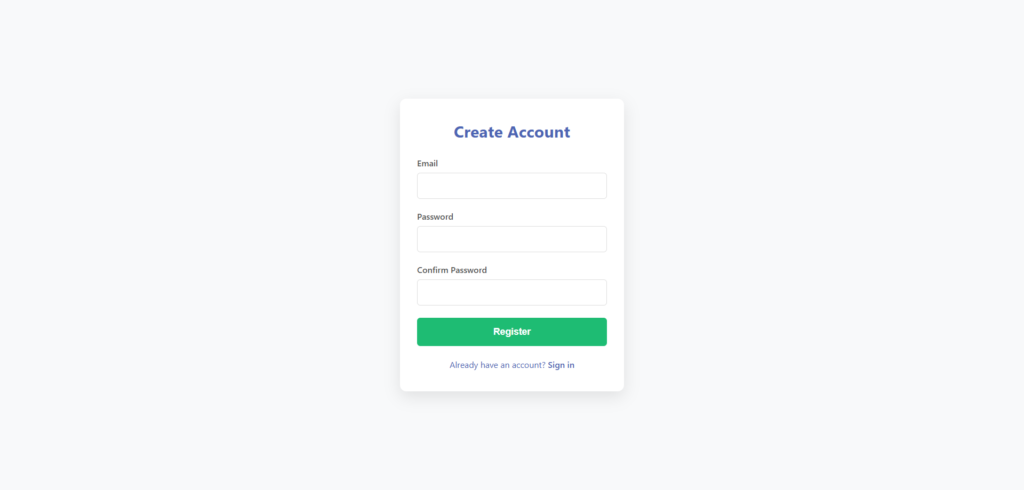
Drop this into a new file called register.php.
<!DOCTYPE html>
<html lang="en">
<head>
  <meta charset="UTF-8">
  <meta name="viewport" content="width=device-width, initial-scale=1.0">
  <title>Register - Your App</title>
  <style>
    :root {
      --primary-green: #1ebc73;
      --primary-blue: #4d65b4;
      --bg-light: #f8f9fa;
      --text-dark: #333;
    }

    * { margin:0; padding:0; box-sizing:border-box; }
    body {
      font-family: system-ui, -apple-system, sans-serif;
      background: var(--bg-light);
      color: var(--text-dark);
      min-height: 100vh;
      display: grid;
      place-items: center;
    }

    .register-container {
      background: white;
      padding: 2.5rem 2rem;
      border-radius: 12px;
      box-shadow: 0 10px 30px rgba(0,0,0,0.1);
      width: 100%;
      max-width: 420px;
    }

    h1 {
      color: var(--primary-blue);
      text-align: center;
      margin-bottom: 1.8rem;
      font-size: 1.9rem;
    }

    .form-group {
      margin-bottom: 1.4rem;
    }

    label {
      display: block;
      margin-bottom: 0.5rem;
      font-weight: 500;
      color: #555;
    }

    input {
      width: 100%;
      padding: 0.9rem;
      border: 1px solid #ddd;
      border-radius: 6px;
      font-size: 1rem;
    }

    input:focus {
      outline: none;
      border-color: var(--primary-green);
      box-shadow: 0 0 0 3px rgba(30,188,115,0.15);
    }

    button {
      width: 100%;
      padding: 1rem;
      background: var(--primary-green);
      color: white;
      border: none;
      border-radius: 6px;
      font-size: 1.1rem;
      font-weight: 600;
      cursor: pointer;
      transition: background 0.2s;
    }

    button:hover {
      background: #18a964;
    }

    .error, .success {
      font-size: 0.9rem;
      margin: 1rem 0;
      text-align: center;
      padding: 0.8rem;
      border-radius: 6px;
    }

    .error { background: #ffebee; color: #c62828; }
    .success { background: #e8f5e9; color: #2e7d32; }

    .link {
      text-align: center;
      margin-top: 1.5rem;
      color: var(--primary-blue);
    }

    .link a {
      color: var(--primary-blue);
      text-decoration: none;
      font-weight: 500;
    }

    .link a:hover { text-decoration: underline; }
  </style>
</head>
<body>

  <div class="register-container">
    <h1>Create Account</h1>

    <?php if (isset($_GET['error'])): ?>
      <div class="error">
        <?php
        $msg = $_GET['error'];
        if ($msg === 'email_exists') echo "Email already registered";
        elseif ($msg === 'weak_password') echo "Password must be at least 8 characters";
        elseif ($msg === 'invalid_email') echo "Please enter a valid email";
        else echo "Something went wrong. Try again.";
        ?>
      </div>
    <?php endif; ?>

    <?php if (isset($_GET['success'])): ?>
      <div class="success">Account created! You can now log in.</div>
    <?php endif; ?>

    <form action="register_process.php" method="POST">
      <div class="form-group">
        <label for="email">Email</label>
        <input type="email" id="email" name="email" required autofocus>
      </div>

      <div class="form-group">
        <label for="password">Password</label>
        <input type="password" id="password" name="password" required>
      </div>

      <div class="form-group">
        <label for="password_confirm">Confirm Password</label>
        <input type="password" id="password_confirm" name="password_confirm" required>
      </div>

      <button type="submit">Register</button>
    </form>

    <div class="link">
      Already have an account? <a href="index.php">Sign in</a>
    </div>
  </div>

</body>
</html>Registration Backend
This is where we enforce the rules. So, here we go with the code, create a file named register_process.php:
<?php
session_start();

try {
    $pdo = new PDO('mysql:host=localhost;dbname=your_db;charset=utf8mb4', 'your_user', 'your_pass');
    $pdo->setAttribute(PDO::ATTR_ERRMODE, PDO::ERRMODE_EXCEPTION);
} catch (PDOException $e) {
    die("Connection failed");
}

if ($_SERVER['REQUEST_METHOD'] !== 'POST') {
    header("Location: register.php");
    exit;
}

$email           = filter_var($_POST['email'] ?? '', FILTER_SANITIZE_EMAIL);
$password        = $_POST['password'] ?? '';
$password_confirm = $_POST['password_confirm'] ?? '';

// Basic validation
if (!filter_var($email, FILTER_VALIDATE_EMAIL)) {
    header("Location: register.php?error=invalid_email");
    exit;
}

if (strlen($password) < 8) {
    header("Location: register.php?error=weak_password");
    exit;
}

if ($password !== $password_confirm) {
    header("Location: register.php?error=weak_password"); // Reuse message or make specific
    exit;
}

// Check if email already exists
$stmt = $pdo->prepare("SELECT id FROM users WHERE email = ?");
$stmt->execute([$email]);
if ($stmt->fetch()) {
    header("Location: register.php?error=email_exists");
    exit;
}

// Hash and store
$hash = password_hash($password, PASSWORD_DEFAULT);

$stmt = $pdo->prepare("INSERT INTO users (email, password_hash, created_at) VALUES (?, ?, NOW())");
$stmt->execute([$email, $hash]);

header("Location: register.php?success=1");
exit;Quick notes on real-world improvements you might add later:
- Rate limit registration attempts by IP (using a simple table or Redis)
- Send email verification (most production systems require it)
- Add CAPTCHA for public-facing registration
- Log registration attempts for abuse detection
This keeps things minimal but secure. Next we can cover logout, session fixation protection, or remember-me functionality if you want to keep building.